.png)
Description
Download Lens – Decentralized Social Graph Protocol for Creators
Overview of Lens (itemprop="description")
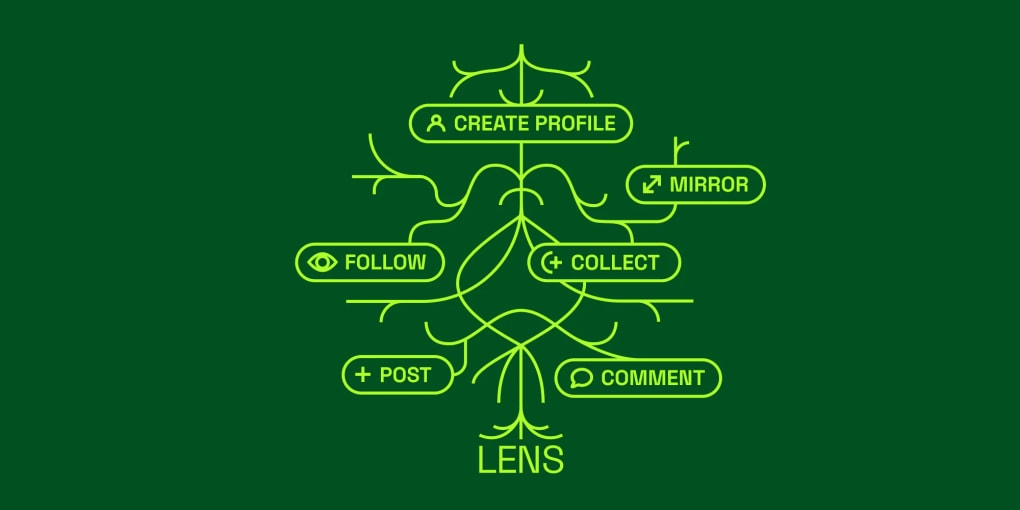
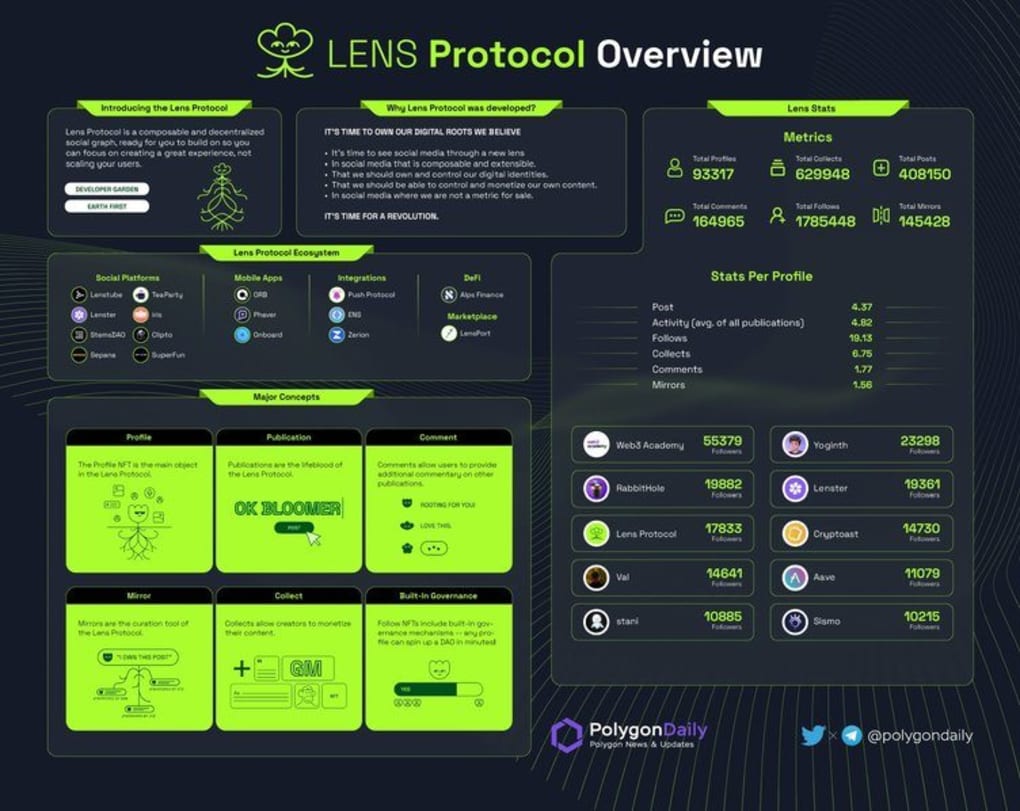
Lens is a groundbreaking decentralized social‑graph protocol that puts creators back in control of the relationships that drive their online presence. Unlike traditional platforms that own the data and dictate how audiences are built, Lens gives each user a portable profile that lives on a public blockchain. This means that every follow, post, and interaction is owned by the individual, not a corporate silo. The protocol is designed for creators, NFT artists, and community managers who want to monetize their content without surrendering ownership. By combining social networking features—such as following, publishing, and collecting—with native NFT minting, Lens creates a seamless bridge between social media and the emerging world of digital collectibles. Whether you are a seasoned influencer looking for a more sustainable revenue model or a newcomer eager to experiment with token‑gated communities, Lens offers a flexible toolkit that scales with your ambitions. Its open‑source nature encourages developers to build custom extensions, turning the protocol into a living ecosystem rather than a static app. In practice, Lens feels like an evolution of tools like TweetDeck or SocialBro, but with the added power of decentralization: you can visualize your social graph, mint posts as NFTs in a single click, and set granular collection rules (free, limited, or unlimited drops). All of these capabilities are wrapped in a secure, privacy‑first architecture that respects user sovereignty while still delivering the familiar UX of mainstream social platforms.
Core Features That Set Lens Apart
- Decentralized Profile Ownership: Each profile is an on‑chain NFT, giving creators true ownership and portability across applications.
- One‑Click NFT Minting: Publish a post and instantly mint it as a non‑fungible token, with options for free, limited, or unlimited editions.
- Social Graph Visualization: Interactive dashboards let you map followers, mutual connections, and audience overlaps in real time.
- Collect & Curate: Users can collect posts as NFTs, building personal galleries or supporting creators directly.
- Token‑Gated Communities: Set access rules based on NFT ownership, enabling exclusive chat rooms, events, or content drops.
- Open‑Source SDKs: Developers can extend Lens with custom modules, integrations, and UI layers using JavaScript or TypeScript libraries.
- Cross‑Platform Compatibility: Accessible via web browsers, mobile wallets, and dedicated desktop clients for Windows, macOS, Linux, Android, and iOS.
- Secure, Permission‑Less Interaction: No central authority can censor or delete content once it’s minted on the blockchain.
The feature set is deliberately built to empower both technical and non‑technical users. For artists, the NFT minting workflow eliminates the need for separate marketplaces; a single post can become a collectible instantly. For community managers, the social graph tools provide actionable insights that were previously locked behind proprietary analytics suites. Moreover, the protocol’s modular design means you can pick and choose the tools you need: start with a simple profile and grow into a full‑fledged token‑gated ecosystem as your audience expands. Lens also supports interoperability with other decentralized services such as IPFS for content storage and various Layer‑2 scaling solutions, ensuring low transaction fees and fast confirmation times. All of these capabilities are wrapped in a user‑friendly interface that feels familiar to anyone who has used mainstream social apps, reducing the learning curve typically associated with blockchain technology.
Installation, Setup, and Daily Usage
Getting started with Lens is intentionally straightforward. First, visit the official Lens website and click the “Download” button that corresponds to your operating system. The installer is available for Windows (.exe), macOS (.dmg), Linux (.AppImage), Android (Google Play), and iOS (App Store). After downloading, run the installer and follow the on‑screen prompts; the process usually takes under three minutes. Once installed, launch the app and create a new profile by connecting a compatible crypto wallet (MetaMask, Coinbase Wallet, or any WalletConnect‑enabled wallet). This wallet will hold the profile NFT and any minted content, so ensure you have a small amount of the native blockchain token (e.g., ETH or MATIC) for gas fees.
The initial onboarding wizard guides you through profile customization: choose a handle, upload an avatar, and set a bio. Because the profile is an NFT, you can later transfer it to another wallet or even sell it on a marketplace if you decide to change platforms. After the profile is set, the dashboard presents three primary tabs—Feed, Create, and Graph. In the Feed tab, you can follow other creators, like posts, and collect NFTs directly from the feed. The Create tab is where the magic happens: compose a post, attach media, and click “Mint.” A pop‑up lets you define minting parameters—whether the NFT is free, limited to a specific number of copies, or open‑edition. Once you confirm, the transaction is signed with your wallet, and the post is minted on the blockchain. The Graph tab visualizes your network, showing followers, mutual connections, and community clusters, which can be filtered by token‑gated status or engagement metrics.
Daily usage mirrors familiar social media experiences. You receive push notifications for new followers, comments, and collection events. The app also integrates with popular analytics tools, letting you track NFT sales, royalty earnings, and audience growth over time. If you prefer a lightweight approach, the web version of Lens offers the same core functionality without installing anything, perfect for quick checks on public computers. Security updates are delivered automatically, and the open‑source nature of the client means you can audit the code or contribute improvements via GitHub. Overall, Lens balances the power of decentralization with the ease of a conventional social app, making it accessible to creators of all skill levels.
Compatibility, Pros & Cons, and Community Support
Lens is built on web standards and blockchain APIs, ensuring broad compatibility across devices. Official desktop clients run on Windows 10 or later, macOS 11 (Big Sur) and newer, as well as most modern Linux distributions with a graphical environment. Mobile support includes Android 8.0+ and iOS 13+, with native apps that integrate directly with mobile wallets for seamless signing. Because the core protocol is accessed via a web interface, you can also use Lens on any browser that supports Web3 (Chrome, Edge, Firefox, Safari) without installing additional software. This cross‑platform reach makes it easy for creators to stay connected whether they are at a desktop workstation, on a tablet, or on the go.
Pros
- True ownership of profiles and content through on‑chain NFTs.
- Instant, one‑click minting with flexible distribution options.
- Powerful social‑graph visualization that reveals audience overlaps.
- Open‑source SDKs encourage community‑driven innovation.
- Cross‑platform availability (Windows, macOS, Linux, Android, iOS, web).
- Low transaction fees thanks to Layer‑2 scaling integrations.
- Permission‑less environment protects against censorship.
Cons
- Initial setup requires a crypto wallet and a small amount of gas token.
- Learning curve for users unfamiliar with blockchain concepts.
- Reliance on blockchain network health; high congestion can delay minting.
- Limited mainstream audience compared to traditional social networks.
- Feature set is expanding rapidly, which may cause occasional UI inconsistencies.
Community & Support
Lens benefits from an active developer community on Discord, Telegram, and GitHub. Regular AMA sessions with the core team provide transparency and gather feedback for upcoming releases. Documentation is comprehensive, covering everything from wallet integration to custom SDK development. For troubleshooting, the support portal offers searchable knowledge base articles, and a dedicated ticket system ensures prompt assistance. Because the project is open source, users can also submit pull requests or fork the repository to tailor the application to specific needs. This collaborative ecosystem not only accelerates feature development but also fosters a sense of ownership among participants, aligning perfectly with the protocol’s decentralized philosophy.
Review Summary: Lens delivers a powerful blend of social networking and NFT minting, giving creators unprecedented control over their digital identities. While onboarding requires basic crypto knowledge, the long‑term benefits of ownership, monetization, and community insight far outweigh the initial learning curve.
Frequently Asked Questions
Is Lens free to use?
Yes, downloading and installing Lens is completely free. You only pay blockchain transaction (gas) fees when you mint NFTs or perform on‑chain actions.
Which blockchain does Lens operate on?
Lens is built on the Polygon network, offering low fees and fast confirmation times, but it also supports Ethereum Layer‑2 solutions for added flexibility.
Can I transfer my Lens profile to another wallet?
Absolutely. Since the profile is an NFT, you can transfer or sell it just like any other token using standard wallet interfaces.
Do I need technical skills to mint NFTs on Lens?
No. The “Create” tab provides a guided, one‑click minting flow that abstracts away all blockchain complexity, making NFT creation as easy as posting a tweet.
How does Lens protect my privacy?
Lens stores only essential metadata on-chain; all media files are hosted on decentralized storage (IPFS) and can be encrypted. Your wallet address is the only identifier, and you control what you share.
Conclusion & Call to Action
Lens represents a paradigm shift in how creators build, monetize, and own their digital communities. By uniting a familiar social‑media experience with the empowerment of on‑chain NFTs, the protocol eliminates the middleman and restores true agency to the individual. Whether you are an NFT artist looking for a frictionless minting tool, a community manager seeking transparent audience analytics, or a developer eager to experiment with decentralized protocols, Lens offers a robust, secure, and future‑proof solution. The platform’s open‑source nature and vibrant community ensure continuous improvement, while its cross‑platform compatibility means you can stay connected wherever you work. Ready to take control of your social graph and start minting content that truly belongs to you? Download Lens today and join the next generation of creator‑first platforms.
Guides & Tutorials for Lens
How to install Lens
- Click the Preview / Download button above.
- Once redirected, accept the terms and click Install.
- Wait for the Lens download to finish on your device.
How to use Lens
This software is primarily used for its core features described above. Open the app after installation to explore its capabilities.
User Reviews for Lens 0
No reviews found




